Sunday, August 17, 2025

Admob ads with mobile app

 AdMob is a ads advertisement

In mobile app which have created app to developed from Android studio. In Android studio we have to create some programs on java or kotlin software programming language. we will discuss about how to implement


Admob ads in Mobile App.

AdMob ads approve, Google ads, Google AdSense, Computer stuff kit
Google AdMob website | App info

Now, open AdMob website follow steps and register to open AdMob website then you need to develop the mobile app such as education, learning, knowledge related apps need to give.

After planning about the Android app implementation, you need to test how it is working in mobile device. then after open Admob give your app name and banner ad you will get the App ID and Banner ad id in your Android SDK (Software Deveopment Kit) Android studio.


Google advertisement, AdSense, earn money, App
AdMob App Settings

You should follow how to add in Android studio with the help of AdMob code implementation steps.

Then, you need to test the google ads is running in your App Development software.

Then go to AdMob website left side have some options there need to select the settings and will appear there as Test Ad then go to mobile device then go to mobile settings then select google and select ads where appear google Ad id (Ex: 39400000-8ef0-12bd-b25e-15b56e80000f) copy or type into your computer system pc or laptop then test ad code into your AdMob website to mention this Ad id then after 15 mins it will show the Test Ad into your Android studio implementation app.

Android app kit, Android studio, Android SDK, Ads google
Ad unit settings | Ad unit ID


After conformed, remember you need to give App ID and Banner ID from AdMob website, which already created on, that need to be given the App Id and banner id after successful with our errors in your Android studio then finally generate APK.


This Android APK file need to be upload respective services like google play, Samsung app store etc.,


Computer Stuff Kit Tips of Topics 38.


How to create WordPress website for your content creation?


How to make Robots.txt in google search console process?


Sunday, May 28, 2023

Home automation with TV remote

How to do home automation light and fan with TV remote?

Embedded system microcontroller 8052 series making home automation light and fan operate with any TV remote.  Mainly use Keil c coding program can making operate between input and output pins of microcontroller 8052.  First take microcontroller at89s52 40 pin, tsop1738 sensor, 5v Relay, microcontroller development board, 5v DC power supply and remote rc5.

embedded system, microcontroller, 8052, 8051
Embedded system micro controller 8052 development board


Keil C coding Example:

#include <reg52.H>

#define SWPort P1 // port definition

Sbit IR = P3^0; // pin's definitions (TSOP1738 sensor pin)

Sbit SW1 = P1^0;

Sbit SW2 = P1^1;

Sbit SW3 = P1^2;

Sbit SW4 = P1^3;

Sbit SW5 = P1^4;

Sbit SW6 = P1^5;

Sbit SW7 = P1^6;

Sbit SW8 = P1^7;

You can use every pin as signal from sensor Sbit SW1=P1^0; is connect single channel 5v relay. if you want eight relay you can connect 8bit port pin of Port one.

For every pin have different code pass signal, you need to take delay function, FLIP FLOP IR sensor. When doing Embedded C coding, first to know TV remote Encode then start to write program based on TV remote some are any king of remote some are particular remote, you can use universal remote-control TV.

When connecting IR sensor TSOP1738 to port pin P3^0; give power 5v and GND third pin to microcontroller 8051 port 3 i.e., P3^0;

In code flower brackets to storage data into ROM of microcontroller 8051. You need to know basic C language coding, then hardware parts, you can make mini projects on Microcontroller or Arduino Uno.

Special focus on single channel relay 5volts, it's also had three pin, 5v, Gnd and input pin. if you need eight channel relays of 5volts based on program you can change your opinion. Don't forget to put header file like as "#include <Reg51.h>".

}

}


The above code is for operate lights and fan through TSOP1738 sensor, the sensor pins +5v, Gnd, output these three pins are connect output pin to Port P3.0 pin.  You can connect port 1 pin 1.0 to pin 1.7 total 8 pins connect to devices like three lights, two fans, bed light so on. You can operate with TV remote button 0 to 9 operate can do ON and OFF.


Computer Stuff Kit Tips of Topics 37.

Blog traffic – how to increase traffic to website

Mobile Internet connection - Browsers like Google chrome, Mozilla Firefox.

Desktop or Laptop Troubleshoot - Monitor, Processor, Hard disk RAM and ROM.

Sunday, May 14, 2023

Motherboard LAN connection NSlookup

How to give connection to Motherboard or Main board?

Motherboard or Main board has buses travelled through wires like as 32-bit or 64-bit processor have. There are several components such as capacitors, resistors, transformers, pins, power supply pins, IDE cables for CD ROM drivers, Hard disk IDE cables or SATA HDD and so on.

On motherboard have PCI slot for external devices to use for other task or application, through PCI slot we use LAN card for internet purpose or TV tuners for television purpose.

Some have Graphic chord is use for display resolutions to adjust with settings, monitor which resolutions are perfect through Graphic drivers. You need to install graphic drivers through CD.

Cabin has Led’s such as Power LED, HDD LED, USB, Power button, reset button wires already had in cabinet, here you need to fix mother board or main board and processor fan wires 4 pins, power supply 24 pins and 2 pins for processor side. Give connect from cabinet to mother board or main board to male pins.

On motherboard have PCI slot connect LAN chord and give Ip address 192.168.1.1 go to command or win + R for RUN and type CMD or command then after open window or application to check networking or internet with some commands.

connection to motherboard, motherboard wires, HDD LED
WIN + R for RUN image-1

If you want to check network website then, go to RUN and type CMD and type nslookup your website ex: nslookup example.com then press enter. It displays about the Ip address like 127.0.0.1 regarding website servers.

command on networking, ip address, nslookup
Command for website image-2

Now, how to connect cabinet wires pins to motherboard male pins, before giving connections here have symbols like + or – or mark with white color on motherboard or main board to do connections wires of power button pins, power LED pins so on.

When power button ON then appear Green LED glow, it means computer or system on internally boot the motherboard through bios setup by display about RAM speed, HDD disk, you need to install or format the operating system called as OS.

Newly installed OS you need to install on Motherboard other software such as MS office, PDF, WIN RAR, Graphic drivers or display drivers, audio drivers or sound drivers and so on.


Computer Stuff Kit Tips of Topics 36.


Saturday, October 1, 2022

Motherboard components and functions

What is motherboard?

Motherboard is a electronic components fixed like RAM, processor, PCI slot, ROM, USB port, VGA port, Keyboard, mouse, LAN port etc., It have SMPS to operate motherboard with 5volts, 12volts, 3.3volts run the computer. It has CMOS for time and data of system. It will run machinery language 0 and 1, 32-bit or 64-bit bus of processor with operating system (OS) windows 7, 8, 10. On motherboard have resistors capacitors, small IC, diodes, processor socket, power supply male all are on board PCB fixed the devices called as Motherboard.

Motherboard, PCB board, components electronics
Motherboard components image-1

There is different motherboard or processor companies like as G41, AMD, Celeron, and Intel processor can run with support of motherboard for it.

The motherboard is a PCB (printed circuit board) has 2- or 3-layers wires buses travelling binary 0 and 1 machinery language. In motherboard have North Bridge and south bridge IC with heat sink component.

 Printed circuit board (PCB) has single layer buses travelling with machinery language 0 and 1. It has negative is zero and positive is one travelling from one place to another place through wires connected to IC pins. It has female and male pins for connector device. In motherboard near processor socket fix the processor like Intel, core to duo, Pentium, small micro pins are there.

The motherboard has AMIBIOS and AWARD BIOS it has ROM store data operation can change settings by pressing DEL or F2 to go which have like DVD writer, CD Rom, USB and parallel port.

Inbuilt or on-board chip to run fast application in computer by run fast through processor and RAM (Random Access Memory). RAM has different like DDR2, DDR3 so on. It has 128-bit RAM, 1GB ram, 2GB Ram up to 64GB ram slot on motherboard. If you got trouble like display black screen, then replace RAM once clean dust on motherboard RAM slot.

If got problem not getting beep sound check the speaker connectors. It connected next step is clean processor wait 10 seconds and replace it. When power ON not booting replace jumper settings near CMOS battery available.

power supply, SMPS power supply, heat sink paste
Power supply SMPS voltages image-2

After remove the RAM or processor then not coming beep sound, then check SMPS power supply problem, Atx 24 pins, 4 pins connector with voltage 12v, 5v, 3.3v are there, take power supply SMPS and connect to motherboard female connector of SMPS male connector. Even if not come then purchase NEW motherboard.

If OS (operating system) win 7, or xp the file in system 32 folder has .dll file. If you delete .dll then after restart OS file corrupted then again format the OS operating system Win xp or win 7, 8, 10 by selecting first boot device CD Rom then put xp or win 7 OS CD into CD rom or DVD writer then follow step how to install OS. It will ask to press any key to format, press any keyword from keyboard then start OS installation process.


Computer Stuff Kit Tips of Topics 35.


Blog traffic – how to increase traffic to website

Mobile Internet connection - Browsers like Google chrome, Mozilla Firefox.

Desktop or Laptop Troubleshoot - Monitor, Processor, Hard disk RAM and ROM.

WordPress Website and Plugins Active - website java, HTML code for AdSense.

Computer server and IP address – what are server and IP address usage.

Tuesday, August 30, 2022

Hex File in Keil software tips

How to create hex file in Keil software?

First go to Google and type as “Keil c51 software free download”, you get software and give details about your information and download it then, after install the keil c51 software into your laptop or desktop.

The Keil c51 software is used for program into microcontroller of flash programming in embedded C program code. It is use for operating by commanding or instruction to IC (integrated circuit). IC is microcontroller 8051 have families 80xx, many companies have like micro controllers. For example: if you want to blink light of a delay. It should write in embedded C code program by using Keil C51 software. The micro controller runs with 1 and 0 machinery language by assembled code #move R0 A.

embedded system 8051, micro controller, integrated circuit
Keil C51 software - image-1

The assembled language was binary code 0 and 1. It have 4-bit, 8-bit, 16-bit, 32-bit and 64-bit of micro controller and configured with 8-bit port pins 40-pin vcc DIP (dual inline pack). It can run command by embedded C code or program into ROM of micro controller through Keil software. For example, embedded C code is Port 1.1 pin connected LED bulb for blink delay (1000) command by run program through Keil software in embedded C code. It must select hex decimal code machinery language 16-bit binary language of hex.

The Keil c51 software have to check before embedded program into IC or micro controller in Keil software have to check peripheral port-1, port-2, port-3, port-4 option are available can use here to check program execution into micro controller or IC.

micro controller 8051, embedded system, ROM memory

Keil C51 software - image-2

The micro controller has 64k ROM to program or code dump into the ROM memory. It operates ROM memory instruction through embedded C program by Keil software flash memory dump into the ROM memory location with instruction software. If you want to check before making project, you can check in Keil c51 software then, go to peripheral click it, then available port 1, port 2, port 3 and port 4.
When written embedded C coding above example check port 1 which given instruction port selected. The Keil software also program ARM, ARM9, ARM11 means (Advance Reduce Machine).  It uses for major projects can do embedded C program. When created hex file then install drivers of flash program equipment then only dump hex file into the ROM memory.


Computer Stuff Kit Tips of Topics 34.

Blogtraffic – how to increase traffic to website

Mobile Internet connection - Browsers like Google chrome, Mozilla Firefox.

Desktop or Laptop Troubleshoot - Monitor, Processor, Hard disk RAM and ROM.

Saturday, August 27, 2022

Blogger fix URL not on google tips

How to change URL not on google?

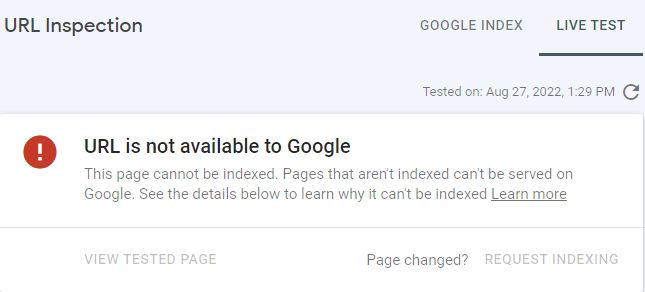
When comes “url not on google”, you can check the blogger or website crawler settings if any change it occurs the message as “URL not on google”.

If you are using mobile internet, it shows the message as “url not on google”. You must check LAN chord network internet can check here it shows as “URL on google”.
In google search console verify ownership then start crawling blogger or website. The main settings are robots.txt give correct syntax to robots.txt for blogger or website, for more details click now about robots.txt.

not on google, url not on google, url inspection
Google search console - url inspection-image-1

Before commencing any blogger or website, you must follow these steps:

1.       Check robots.txt

2.       Check blogger settings on errors or crawling

3.       Check blogger header tags, achieve and pages search tags and pages or posts tags.

4.       Check which internet using mobile or LAN internet broadband.

When getting error message as “not found 404”, which have change url address then shows as error as “404”. It comes by using the mobile internet of message as “not found 404”.

Better use LAN chord internet broadband internet such message not come as “url not on google”, see the screen shot for your reference.

url is not on google, url inspection, index
Google search console - url inspection-image-2

If comes message as “404” old url to new url in blogger settings as “Error and redirects” use old url in custom 404 and custom redirects. If you want more details, click now about old url to new url.

If you check url inspection then coming message as “ url not on google”, then check live test and request as index. It takes time 24 hours or more to update. If you get not index in coverage or pages, then request to validation and wait 24 hours or more to update.

How to know indexed or not?

If you want to know index, then type as “site:example.com” it shows about index with meta description. You must check to rank a url or website give keywords to mega description to crawl the keywords to search about your niche.

If you use related keywords, then get click related url to find the queries. In google search console shows in coverage or pages or performance to check how it will run by watching queries, countries, device, url etc., by observing impression daily basis to know the ranking by watching impressions. If you follow above described, you can rectify the errors by inspecting url’s.


Computer Stuff Kit Tips of Topics 33.

Fix the website browsing error - Proxy settings, Internet Properties, Antivirus.

Howto get blog traffic- To know about how traffic increase.

Monday, August 1, 2022

How to Increase Blog Traffic fast

How to do blog traffic?

Before starting blog or website, need to collect the data or information. If you do SEO correct way, then start to increase traffic of your blog or website. First gather information of any topic select the keywords apply your blog post or content. Go to google then search related keywords. Put into the blog post or content. It will run in search engine SEO. If you put keywords related topics or data, then slowly increase traffic of your blog or website.

First step header h1 title of your blog main title must remaining h2, h3 tag body of the data or content. When posting any topic need to gather related keywords or content same. Some have blogger traffic generator, can make easy getting traffic, another way is back-links. Create back-links it is like mouth-to-mouth data or post to increase traffic.

Blog traffic, google search console, ranking
Google search console Image-1

To get ranking and more traffic, you should maintain google search console and robot txt, in google search console check performance have impressions, if gets impressions then consider website or blog is running traffic. When check URL inspection not in google then do live check if available then request index. If you get index blog urls then start to increase traffic.

Once updated in google search console of your website or blog need to wait three months to six months, be patience. It will collect data or information from search engine web crawler through robots.txt. Robots.txt is a web crawler, it is use for instructing to bots, there are so many bots, you can instruct of your website or blog. Already posted about robots.txt once refer.

Google search console, ranking traffic, error
Google search console Image-2

Sitemap.xml is to index the pages through google search console, once created automatic update as last read. Sitemap is a map for your website or blog data along with url submission. If you want to check whether it is indexed or not, then use site:yourwebite domain type as ex:site:www.example.com to list out the index shows with url and description.

blogger traffic, online traffic, google search tool
Google search console Image-3

To get more views of your page from website or blog need to follow above steps to get success of your website. If you get “not in google” message comes then search in url inspection, whether index or not once checked click request index. It will take to update within 24 or 36 hours. Remember sitemap, url inspection and verify site ownership to get successful result to get traffic.


Computer Stuff Kit Tips of Topics 32.

Fix the website browsing error - Proxy settings, Internet Properties, Antivirus.

GSM / GPRS Tracking - Mobile data 2G, 3G and 4G LTE cellular network.

Mobile Internet connection - Browsers like Google chrome, Mozilla Firefox.

Desktop or Laptop Troubleshoot - Monitor, Processor, Hard disk RAM and ROM.